
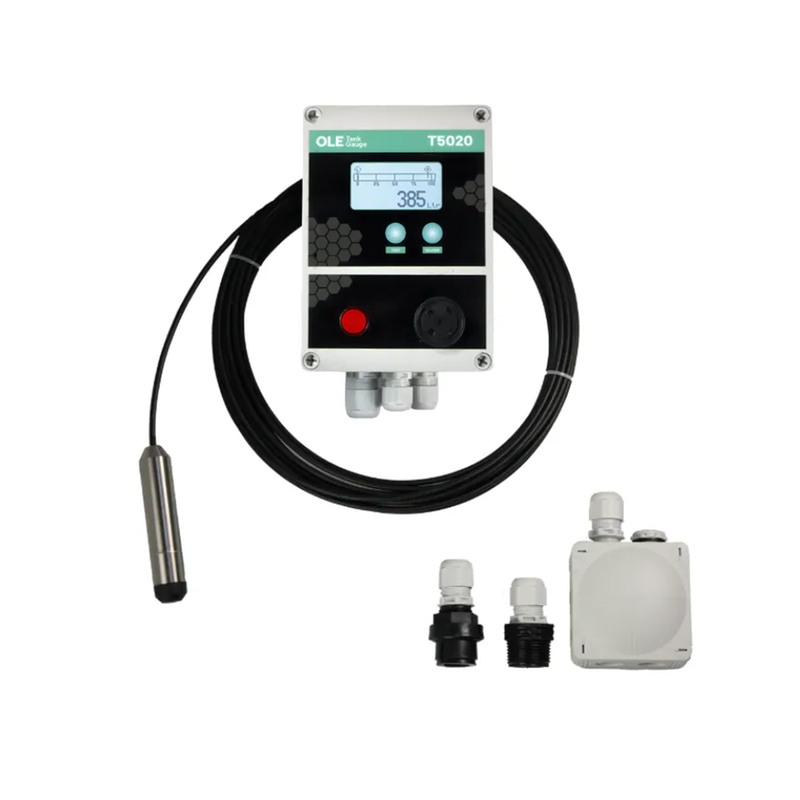
OLE GAUGE T5020 c/w Probe for tanks up to 3m in height


- Found a better deal? Message us to price match.
Same-day dispatch
In-stock orders by 2pm AEST
Australia-wide delivery
Direct to your job from Brisbane
Authorised service
In-house warranty + repairs
Trade pricing for all
No trade-only accounts
The OLE T5020 Automatic Tank Gauge, from GO Industrial, is an accurate, yet cost effective instrument to measure and report on the level of liquids within a tank. The OLE T5020 reads a hydrostatic pressure sensor that is suspended into the tank. Accuracy is +/- 0.5%.
Specifications
Supplied with Console and Probe Assembly, suitable for tanks up to 3m in height
- Accuracy +/- 0.5% or better.
- Litres Display, % Bar and Alarm Status,
- Can accept up to 3 additional probes including:
- Temperature Probe
- High Level Probe or Water Bottom Sensor
- Bund Probe
- 4-20 mA output for BMS + Modbus RTU as standard
- Suitable for any height / shape of Tank.
- Low Installation & Maintenance Costs
- IP65 weatherproof enclosure
- Alarm Test Functions, two button auto reset operation
- Single power connection for multi-functions
- Replaces separate Gauge, High / Low and Bund Alarms
- Adjustable backlighting - note backlight turns off after 1 hour
- Adjustable Screen Resolution
- Adjustable Safe Fill Level Setting
- Suitable with Diesel, Biodiesel up to B100, HVO, AdBlue and Coolant / Antifreeze
- Tank probes are an electronic pressure sensor with a DN25 (1") M BSP fitting.
- Level probes must be suspended 50mm from the bottom of the tank.
- 1 gauge required per tank. Slave display option available.
- Options- Choose between bund probe or water bottom sensor
- Relay board fits inside gauge housing, 4 volt free outputs
Installation
- With simplicity in mind, the T5020 tank gauge can be installed in less than 1 hour.
- Sensor into tank, wired to display, mounted on wall or pipe.
- Plug in lap top configuration.
- Power supply can be 24vdc, so no mains power required (Multi power supply included, 12/24vdc or 100/240 vac)
Inputs / Outputs
- Power Supply 18-24 vdc (with optional 110-240 vac power supply)
- Input : 1 x Tank Sensor 4-20 mA (new or existing measuring sensor)
- Input : 2 x Digital inputs, Normally Closed (H and B Alarms)
- Output: 1 x Modbus RS485 with registers for all features
- Output: 1 x 4-20 Output: 4-20 mA proportional to Litres Capacity.
- Output: 4 x Level Triggers. 24vdc as std, or Volt Free Relay Option
- Output: 1 x Bund Condition Digital condition (NC To BMS)
FAQ's / Trouble Shooting
Siren will not sound when the test button is pressed
- On T4020 / T5020 the test button must be pressed for 5 seconds before the siren will sound. Check the 8-way green connector is fitted correctly (see wiring diagram). When R5 relays are incorporated the siren, connection is on the front 8-way green connector.
High level Alarm failed to sound
- If the M alarm symbol is Blacked out and there is a cross through it, the unit has Alarmed and has been acknowledged.
- Pressing the test button will sound the alarm and pressing again will stop it.
Gauge reads LOW
- If the sensor is reversed wired = LOW
- If the sensor is not connected = LOW
- If the sensor output is less than 3.8mA = Low
Gauge reads HIGH
- If the sensor wires are broken it will read LOW Sensor has failed / shorted out
- Water ingress into the sensor reference pipe
Display does not read litres = Blank
- Water ingress into junction box shorting out gauge
- Water ingress into reference port tube in sensor
- Power has failed, check with a multi meter
Gauge litres are drifting more tank ½ %
- Water ingress into sensor reference pipe
- Sensor is ending its life.
- Check milliamps
- Vent on tank has blockages
- High winds in the area cause pressure fluctuation, increase damping on screen settings
Sensor replaced and gauge reads wrong / lower or Higher than it should
- Work out the percentage the gauge reads incorrectly
- Example - 15000L was put in and the gauge only registered 12000L. 12000/15000 = 0.8
- If they have put in a 3.0m sensor in place of a 2.5m sensor, 2.5/3.0 = 0.833 so may need to change the sensor parameters in the gauge setup
Garbled Screen Display
- The display is broken up and does not show all pixels.
- Try power down the unit and then back up.
- Usually caused by power spikes on generators.
- Can be caused by incorrect RS-485 connection / disconnection (Modbus RTU)
New gauge setup does not read correct litres
- Gauge has been configured by client and the litres does not match the dip value or calculated value in the tank.
- This is usually because the sensor parameters have been set wrongly, and the “B” values have been set as the tank height rather than the SENSOR SPAN + “A” OFFSET.
- So, a 3.0m sensor should be set A 0.05 if set 50mm off the bottom of the tanks and the “B” value would be 3.05.
- This is 3.0m sensor plus the 50mm offset.
Relay settings not showing on the display
- When using relays the active alarms will display on the front screen, unless there is a BundAlarm fitted in which case the M Master symbol will show and the B Bund symbol.
- The relaysare still active just not shown on the front display.
Relay R4 and R5
- The R4 has 4 level trigger points, M,1,2,3.
- The R5 has 4 level trigger points and one volt free out for the B (Bund) as well.
- The M(Master) alarm can be acknowledged from the front panel and this action resets this output.
Testing Alarm
- The test feature is a press and hold for 5 seconds to activate.
- Press again to mute.
Unable to connect the gauge to PC / Laptop
- The Laptop connection is with a USB to RS-485 cable.
- You need to know which “Port” thecable is associated with.
- This needs to be set in the Program Settings.
- Please see the section in the manual that advises how to do this. (See pages 6 to 8).
- Please do not call GO Industrial if communication is the issue as we are not IT experts.
Gauge reads HIGH or LOW
- The sensor parameters must be set based on the sensor range and NOT the tank height.
Alarm trigger point errors
- These can be reset by connection to a laptop and running the OLD configuration software
Displayed Litres is LOW
- Damage to the input circuitry can make the gauge read low by 5% and 10%.
- Check the board for a burning smell.
- The board is usually beyond economical repair and suggest purchasing a new board, Part No. T4020-0002B.
Bund Alarm Connection
- Bund alarm is connected but does not operate.
- Check the black jumper is on the 2 pins next to the green 2-way connector. (See page 4).
- Power down and then back up and the B symbol will show on the display.
H Alarm
- H (HIGH or Water) alarm is connected but does not operate.
- Check the black jumper is onthe 2 pins next to the green 2-way connector. (See page 4).
- Power down and then back upand the B symbol will show on the display.
Data Sheet
Manuals
Shipping & Returns
Same-day dispatch from one of our national warehouses on in-stock orders placed before 2pm AEST.
30-day returns on unopened, stocked items — customer pays return freight. Non-stocked / special-order items are subject to a 50% restocking fee.
Field videos & walkthroughs.
More videos
Tap a thumbnail to switch the main player.
-
 Video 1
 -
 Video 2
Need help speccing your kit?
Talk to a real specialist on our team. We'll match the right unit to your daily volume and the materials you spray most.